Free shipping in DE
  30 day returns
  Secure payment
  2 years warranty
Connecting Garmin to Treadmill: Your Complete Guide
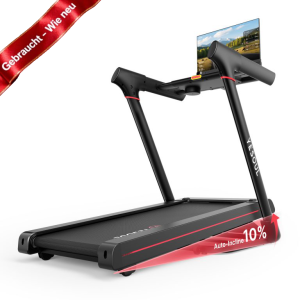
The world of fitness tracking has made tremendous strides in recent years. One of the leading brands in this space is Garmin, known for its high-quality GPS watches and fitness devices. Many users wonder how to connect their Garmin devices to a treadmill to seamlessly sync their workout data and ensure an effective workout experience. This article will show you how to easily connect your Garmin watch or Garmin fitness device to your treadmill.
Why connect Garmin devices and treadmills?
Integrating Garmin devices with treadmills offers numerous benefits. First, it allows you to track your training data in real time. Second, it allows you to analyze your progress over time. This information is crucial for achieving your fitness goals, whether running, cycling, or even strength training. By connecting your devices, you not only optimize your workouts but also increase your motivation by visualizing your progress.
The right conditions for a connection
Before you begin the pairing process, you should make sure that both your Garmin device and your treadmill are compatible. Many modern treadmills offer the ability to connect to Garmin devices via Bluetooth or ANT+. Check the technical specifications of your treadmill and your Garmin device. Also, make sure both devices are updated to the latest software version to avoid complications.
Step-by-step connection guide
Step 1: Preparation
Make sure your Garmin device and treadmill are turned on. Also check if Bluetooth is enabled on your Garmin device. If necessary, go to your device's settings and enable Bluetooth.
Step 2: Download the Garmin Connect app
If you haven't already, download the Garmin Connect app to your smartphone. This app is a central tool for connecting your devices and managing your training data. You can download it for both iOS and Android devices from the respective app stores.
Step 3: Connect via the Garmin Connect app
Open the Garmin Connect app and log in to your account. Go to "Devices" in Settings and select "Add Device." Follow the onscreen instructions to pair your Garmin device with the app. You should now see your treadmill in the list of available devices. Select your treadmill and confirm the connection. The app will then sync your data.
Step 4: Start training
Once you've successfully connected the devices, you can start your workout on your treadmill. Make sure your Garmin device stays within range of the treadmill during your workout to ensure uninterrupted data transmission. Your heart rate, distance, and other key metrics will now be recorded in real time and displayed in the Garmin Connect app.
Troubleshooting
Sometimes problems can occur during the connection process. Here are some common errors and possible solutions:
- No connection possible: Check that both devices are charged and Bluetooth is enabled.
- Unstable connection: Make sure your Garmin device is within range of the treadmill and there are no other Bluetooth devices nearby.
- No data transfer: Make sure your device and the Garmin Connect app are up to date.
Use additional functions
A connection between your Garmin device and the treadmill also opens the door to additional features. For example, you can create different training plans and workouts within the Garmin Connect app. You also have the option to share your progress via social media or adjust your coaching strategies for optimal results.
Summary of benefits
Connecting Garmin devices to treadmills ensures all your fitness data is consolidated in one place. Seamless synchronization allows you to more effectively track your performance improvements and stay on top of your fitness goals. Whether you're an experienced athlete or a newbie, this integration will enhance your training experience and motivate you to achieve better results, step by step.
Tips for optimizing your Garner usage
To get the most out of your Garmin device and treadmill, here are some useful tips:
- Use the live tracking feature to let friends and family participate in your workout in real time.
- Set specific goals in the Garmin Connect app to increase your motivation.
- Participate in challenges within the app to compete with other users.
The combination of technological advances and personalized training allows you to achieve your fitness goals faster and more effectively. Garmin developers listen to user feedback and continuously improve their products to meet the changing needs of athletes. Make your fitness journey even more exciting and successful by properly connecting your Garmin devices and treadmill!